By MICKLE AUDIO · 2026-11-11
Choose the workflow before the connector
An audio interface connects audio sources to a recording device and returns playback to speakers or headphones. A mixer brings sources together with hands-on level and routing controls. Some mixers include an audio interface, but the word USB on a product does not tell you how many separate tracks the computer can record.
For a voice stream with music playback, a stereo mix may suit your workflow. For editing individual microphones after recording, ask how many independent recording channels the exact model sends over USB. Count simultaneous microphone, instrument and stereo sources separately; do not infer them from a model number.
Do you need a finished mix or separate tracks?
A compact mixer can be useful when an operator wants immediate access to several sources while sending a combined feed to a stream or PA. An interface can suit a computer-centred setup where recording software handles the mix. Neither device type automatically guarantees multitrack USB recording.
Check the input list, USB recording/playback channel count and routing diagram together. A stereo input pair and a microphone input are not interchangeable. Also check whether USB is used for audio, media playback, device connection or power; these are different functions.
Monitoring and computer playback matter
Ask how microphones are monitored while computer audio is playing. Direct monitoring, input/playback mix controls and loopback describe different parts of the workflow; confirm what the chosen hardware and driver support. Loopback is not a substitute for checking the routing in the streaming software.
Confirm the computer or mobile device, operating-system version, connector, cable and driver requirements. Do not assume a USB-C connector guarantees a particular channel count or compatibility. If an application requires Hi-Z instrument input or phantom power, verify those functions for the exact input being used.
Compare actual models without mixing up versions
The published UC22 specifications list two combo microphone/line inputs, 24-bit/192 kHz audio, direct monitoring and loopback. UC22 Value is a separate product configuration; do not transfer the standard model's resolution or connection specifications to it without confirmation.
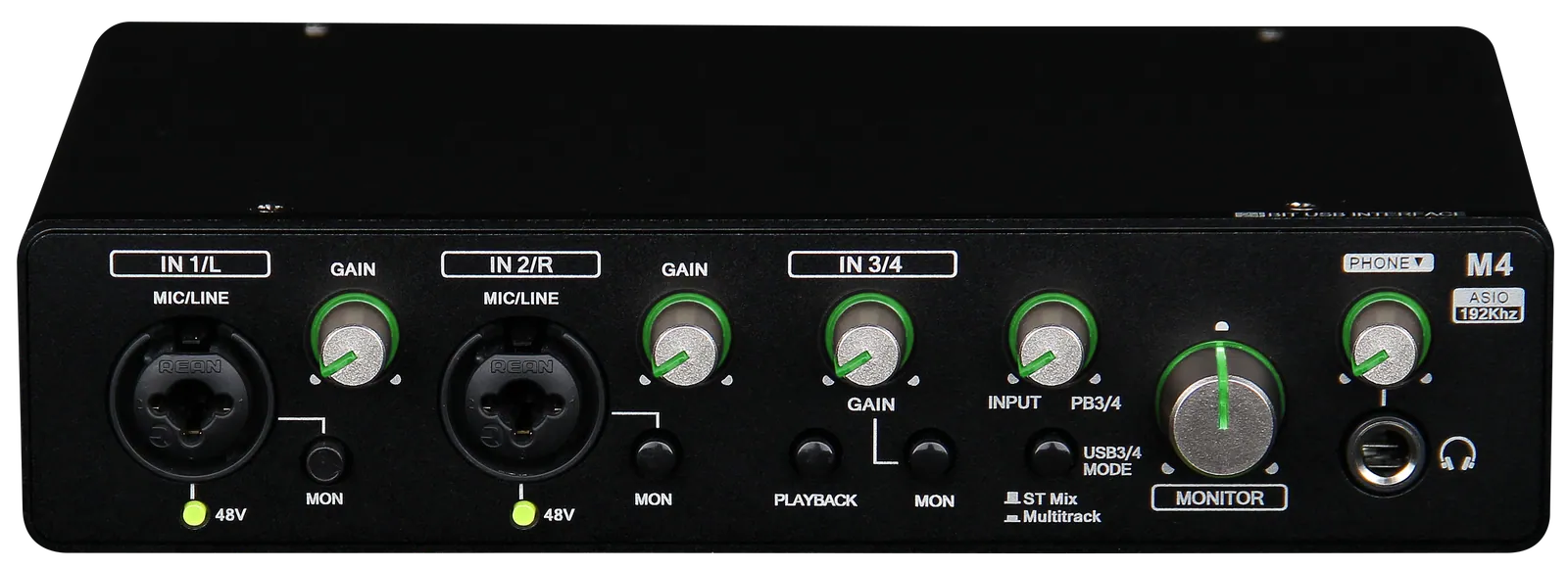
The MICKLE M4 interface is listed as four inputs/four outputs with a direct input/playback monitor mix. AMIXS compact mixers provide another layout for buyers who want channel controls on the desktop. Use the individual model page to compare the complete connections rather than treating all USB products as equivalent.
What to include in a recording or distributor inquiry
Send the number and type of simultaneous sources, whether separate recording tracks are needed, the recording/streaming application, and the device and operating system. Describe the monitoring and speaker connections you want to use.
For an OEM or distributor quotation, add the model, order quantity, branding needs and destination market. Request confirmation of the final recording format, driver package and accessories before ordering. This guide is a selection checklist, not a compatibility promise for every device.
Related mixer resources
Compare USB audio interfaces
View UC, FA and M Series model specifications and monitoring options.
Compare mini mixers
Check compact mixer layouts and the USB functions listed for each model.
UC22 USB audio interface
Inspect the standard UC22 specifications and product connections.
M4 USB audio interface
Review the four-input/four-output configuration and monitoring controls.
Technical background references
General background only. MICKLE / AMIXS model specifications are listed in the linked product pages; these references do not imply third-party endorsement.