By MICKLE AUDIO · 2026-10-08 · Updated 2026-10-12
A closer look at the TT SD8
Choosing a compact mixer is not simply a matter of counting channels. Input connections, monitoring access and the position of everyday controls all affect how a setup is organized. The MICKLE TT SD8 brings these considerations together in a front-panel design with a clearly defined connection section and repeated channel-control groups.
This preview examines the supplied product rendering. Final audio specifications and supported operating modes should be confirmed with MICKLE AUDIO before purchase.
Connections grouped across the top
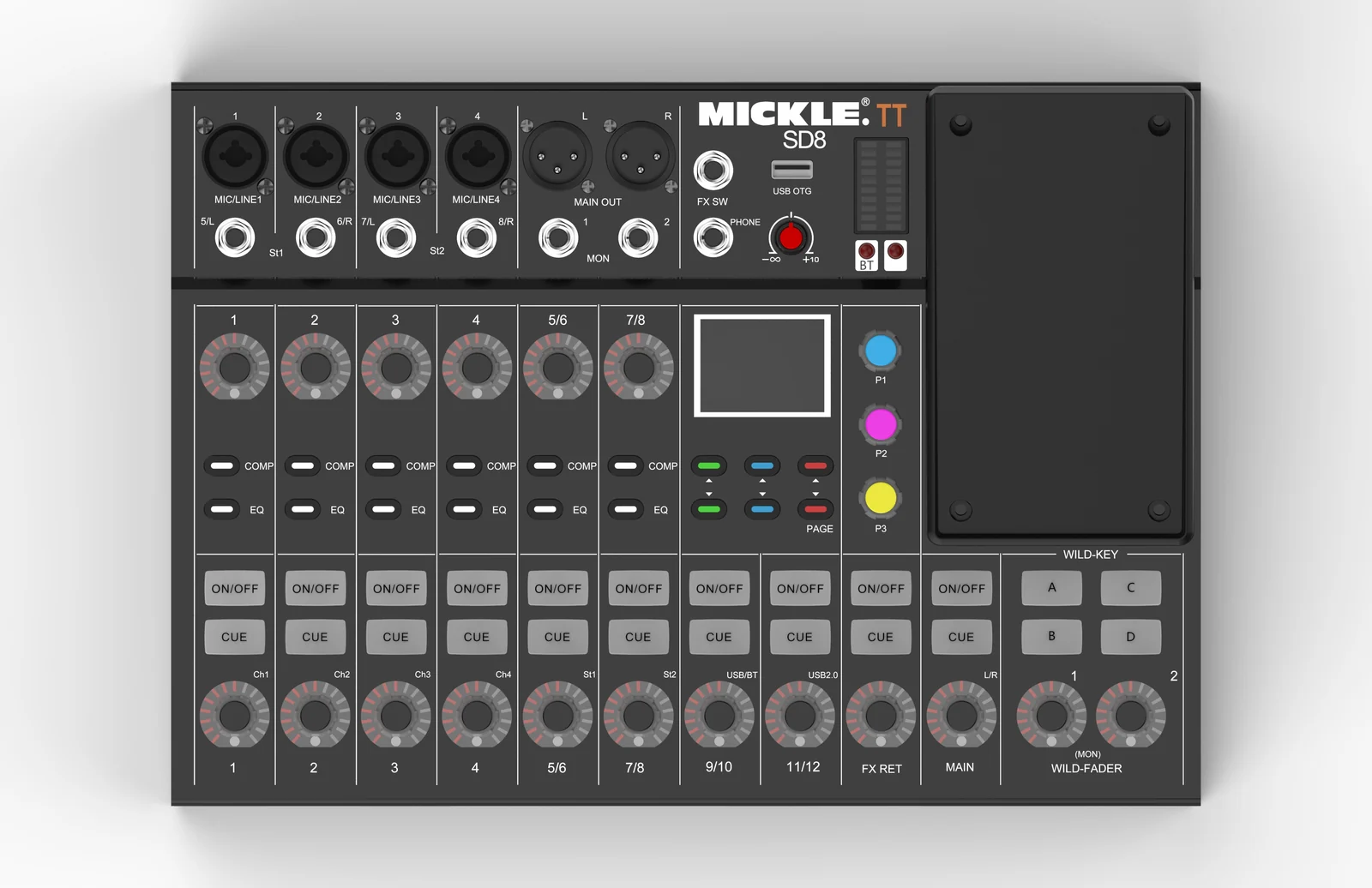
The top-left section shows four combination-style sockets labeled MIC/LINE 1 through MIC/LINE 4. Below them are four jack sockets labeled 5/L, 6/R, 7/L and 8/R, arranged as the St1 and St2 sections.
For buyers planning a system, this layout provides a useful starting point for an input checklist: identify the microphones and other sources to be connected, their output types and whether they will be used in mono or stereo.
The rendering does not establish phantom-power support, input gain ranges or simultaneous routing capabilities. These details belong in the technical specification, not in assumptions based on socket appearance.
Main outputs and monitoring connections
The upper connection area also includes MAIN OUT sockets marked L and R, MON sockets marked 1 and 2, a PHONE socket and an FX SW socket. A headphone-symbol rotary control sits nearby.
Keeping these connections visible in the same upper section gives buyers a clear view of the proposed output layout. For a small performance, rehearsal or presentation setup, the practical question is whether the available output routing fits the required main and monitor feeds.
Connector labels alone do not confirm output levels, independent monitor mixes or footswitch behavior. Ask for the routing diagram and supported control functions when specifying the system.
Direct channel controls
The main control area shows rotary controls and COMP and EQ keys associated with channels 1–4 and the 5/6 and 7/8 stereo sections. Lower controls are labeled for those channels, USB/BT, USB2.0, FX RET and MAIN, with ON/OFF and CUE keys above them.
These labels make the intended control groups easy to identify in the rendering. Buyers should check how the keys and rotary controls work in the production unit, including which parameters are available and how their current values are displayed.
USB labels and the right-side control area
The upper panel includes a USB OTG port and a BT-labeled section. The center-right area shows a display, colored P1, P2 and P3 controls, and PAGE keys. On the far right are a large rectangular panel, WILD-KEY buttons labeled A–D, and two MON WILD-FADER rotary controls.
These areas deserve particular attention in a demonstration. Their exact roles, supported USB devices, Bluetooth functions and any external-device requirements need confirmation. USB labeling should not be interpreted as a promise of multitrack recording, a specific sample rate or universal phone compatibility.
The following screenshots show the digital mixer app's EQ and compressor pages. The app version, supported devices and compatibility with the TT SD8 should be confirmed before specifying a complete setup.
Digital mixer app: EQ and high-pass filter view
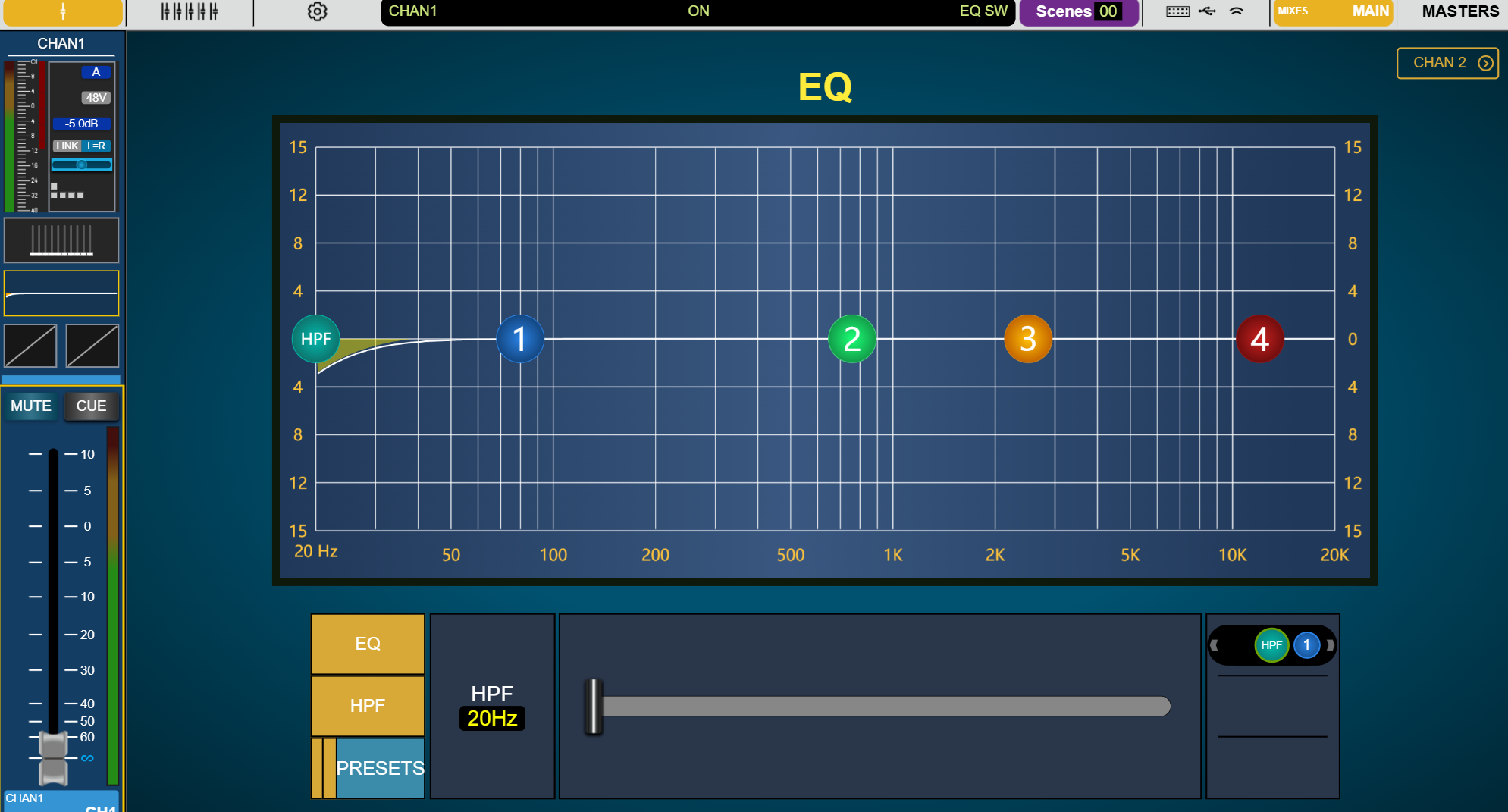
The EQ screenshot shows a frequency-response graph, four numbered EQ band controls and a separate HPF control. The selected channel strip remains visible on the left, including its level indication, fader, MUTE and CUE controls. Channel navigation and a Scenes indicator appear across the top of the interface.
A graphical view gives operators a way to see the displayed EQ curve alongside the channel controls. When evaluating the complete mixing system, ask how software adjustments correspond to the hardware controls and displays.
Digital mixer app: compressor view
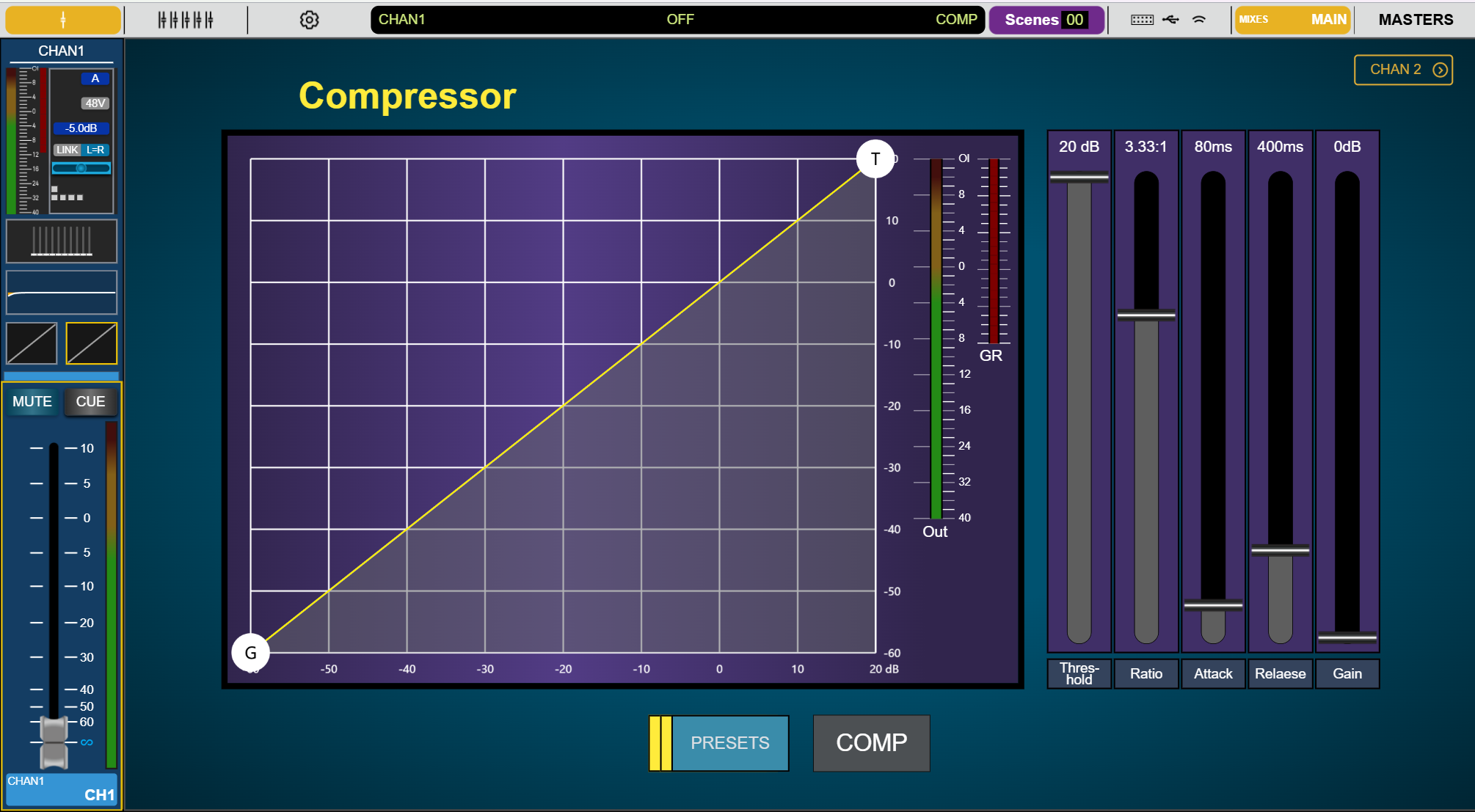
The compressor screenshot brings the response graph together with Out and GR meter areas. Five controls are labeled Threshold, Ratio, Attack, Release and Gain, with COMP and PRESETS buttons below.
These screenshots illustrate the software layout; they are not a full processing specification or a confirmation that both previewed products support every function shown. The displayed numbers are screenshot values, not stated parameter limits, factory defaults or recommended settings. Supported functions, control synchronization and app requirements should be verified with the relevant mixer documentation.
Prepare a project-based inquiry
To evaluate the TT SD8, start with your actual sources and destinations: microphone count, stereo playback sources, main speakers, monitoring needs and any computer or mobile-device connections.
Contact MICKLE AUDIO for the latest specification sheet, routing information, demonstration details and availability. Share the intended application, destination market and required quantity to help the team recommend a suitable configuration. Email amixs@mickle.cn or use the inquiry link below to prepare your request.